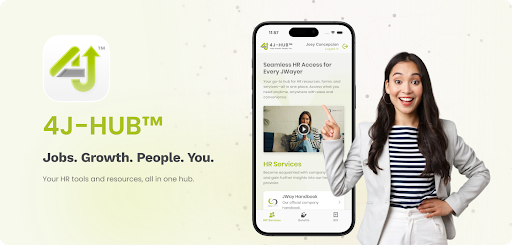
Launching an app is always exciting. Getting it approved can sometimes feel like a project of its own. That was exactly our experience while submitting 4J Hub™ to the App Store.
What began as a straightforward submission turned into a series of rejections, revisions, and clarifications. Along the way, we learned how strict the review process can be. Not just with the app itself, but with distribution settings, description wording, and how the app is positioned.
⚠️ Critical warning. Read this first. If your app is approved under Private distribution, you cannot switch it to Public later. Plan your distribution early. Otherwise, you may need a new app listing and a new Bundle ID.
Surviving Guideline 3.2: The Private vs. Public Distribution Trap
Since 4J-Hub™ was originally designed for employees of our organization, our first submission used Private distribution. This worked well internally, especially for TestFlight testers.
Later, we decided to showcase the app to potential partners and clients, which meant switching to Public distribution. That’s where issues began.
The App Store Review team carefully read our app description and concluded that the app was meant for internal use only. We were rejected under Guideline 3.2 — Business.
The catch: Distribution is a one-way street
Here’s the biggest lesson: once your app is approved, you cannot switch from Private to Public distribution. Our only option was to create a new app listing with a new Bundle ID, and set it to Public from the start.
Solving Guideline 3.2: The “Login Wall” (Guest Mode Fix)
One of the most important changes we made was fixing what reviewers often see as a “login wall.”
Initially, the app required login on launch. From a reviewer’s perspective, that can make the app look like a restricted internal tool—or even feel “broken” without credentials.
The fix: Add a Guest Mode (Unauthenticated Experience)
To satisfy Guideline 3.2 expectations, we redesigned the flow so users can access meaningful content before logging in.
What users can see without logging in:
- A working Home screen (not a blank login gate)
- General informational content (e.g., announcements, policies overview, “About” pages, public resources)
- Enough content to understand the app’s purpose and value
When login is required:
- Only when users interact with protected actions like forms, requests, or anything tied to personal or company-specific data
This shift—moving login after the initial value proposition—made the app feel compliant, usable, and reviewable.
Surviving Guideline 3.2: Description Pitfalls (Wording Matters)
With the new Public app listing, we thought we were already clear. But Apple flagged our app again. The wording in our App Store description still suggested it was meant for employees or internal users.
This was surprising—every single word mattered. Even small hints that the app was “for employees” or “internal” triggered another Guideline 3.2 rejection.
The fix: Reposition the description for a broader audience
We rewrote the description to focus on the platform’s wider value instead of sounding like an internal tool. Instead of “employees can log in to view…,” we emphasized 4J-Hub™ as a hub for HR resources, learning, and support—without framing it as restricted to a single organization.
That reframing made all the difference.
Handling Guideline 2.1: Answering Apple’s “Information Needed” Questions
Even after fixing the login flow and description, we faced another rejection under Guideline 2.1 — Information Needed.
Apple requested detailed answers about our business model and user base, asking questions such as:
- Is the app restricted to one company?
- Which companies are currently using the app?
- How do users obtain accounts?
- Is there any paid content?
What worked
We responded with clear explanations and provided demo credentials so reviewers could test all features. This helped show that the app was not “locked away” or limited to a single internal audience—and it significantly smoothed the review process.
Avoiding Guideline 4.3(a): Duplicate App / Staging Rejection
Just when we thought we were done, Apple flagged 4J Hub™ under Guideline 4.3(a) Design Spam, stating that it duplicated another version already in the App Store.
This referred to the older Staging (Private) version that was still listed.
The fix was to use TestFlight for staging instead of maintaining a second App Store listing.
We clarified that the Public version was the official release and confirmed that the Staging version would be removed to avoid overlap. After that, the review moved forward.
Takeaway. Keep only one production listing in the App Store. Use TestFlight for staging builds to avoid duplicate app flags.
Final Approval 🎉
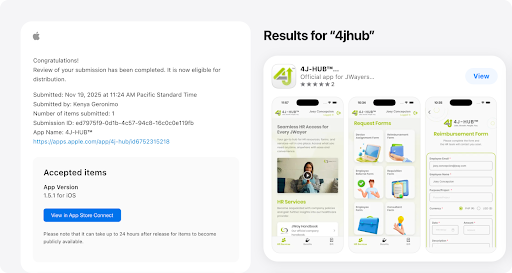
After multiple rejections, back-and-forth clarifications, and several resubmissions, 4J-Hub™ was finally approved for Public distribution. Today, the app is searchable in the App Store for anyone to download.
This approval felt like a huge milestone not just because the app is live, but because we navigated one of the strictest review processes in tech.
Key Lessons Learned
- Choose distribution carefully. If you’re approved under Private distribution, you can’t switch to Public later. Decide early.
- Avoid the “login wall.” Implement a Guest Mode / Unauthenticated Experience so reviewers can see value before credentials.
- Every word matters. Your App Store description will be interpreted strictly—avoid phrasing that suggests internal-only use.
- Prepare detailed answers. Apple will ask about users, business model, and onboarding—clarity helps approvals.
- Provide demo accounts. Giving reviewers access reduces friction and speeds up validation.
- Don’t publish staging as a second listing. Use TestFlight for staging to avoid Guideline 4.3(a) duplicate/spam issues.
- Expect a stricter process than Google Play. It can be frustrating, but it forces tighter alignment between your flow, positioning, and compliance.
Submitting to the App Store wasn’t easy—but it was worth it.
Got questions about building or publishing your own product? Message us and let’s talk through it.