
In recent years, the convergence of mobile development and artificial intelligence (AI) has opened up a new realm of possibilities for developers. By integrating machine learning (ML) capabilities into Flutter apps, developers can create intelligent and predictive user experiences. This blog post will explore how to leverage pre-trained models, implement custom ML models, and integrate ML-powered features into your Flutter applications.
Leveraging Pre-trained Models with TensorFlow Lite
TensorFlow Lite is a popular framework for running ML models on mobile and edge devices. It allows you to take pre-trained models and run them efficiently on your Flutter apps.
Step 1: Adding Dependencies in Flutter
First, add the necessary dependencies to your pubspec.yaml file:
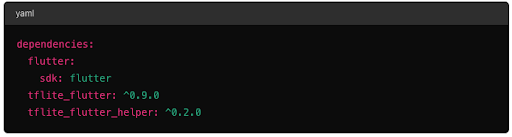
To start integrating machine learning models into your Flutter app, the first step is adding TensorFlow Lite dependencies. These dependencies will provide the necessary tools and libraries to run your ML models efficiently on mobile devices.
Step 2: Loading and Running the Model
Create a service to handle loading and running the model:
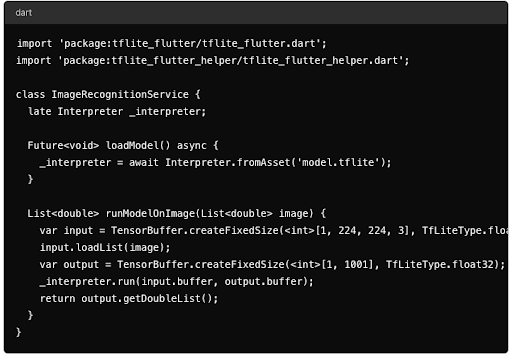 Loading a TensorFlow Lite model and running it on an image.